HOW VALORACRM WORKS

A clear process for
every role in your team.

ValoraCRM turns the real estate sales journey into a connected daily rhythm — from setup and lead assignment to calls, site visits, pipeline management and audit-ready oversight.

VALORACRM SYSTEM STRUCTURE

ManagementStaff, settings & control
LeadsCapture, import & assign
ActivitiesCalls, meetings & visits
DealsPipeline & completion
InsightDashboards & audits

MANAGER WORKFLOW

Set the direction.
Keep the whole operation moving.

Managers configure the CRM around their business, organise the team, distribute opportunities and keep a close eye on activity and outcomes. Every stage is visible without needing to chase spreadsheets or updates.

01MANAGER

Configure the CRM for your operation.

Start by setting up the shared language of your sales process. Define the deal pipeline stages, deal statuses, lead statuses and call statuses your team will use every day. You can also initialise lead actions, interests, ranks and tags so reporting stays consistent from the first lead onward, and build out your property and inventory catalog by region, city, district, developer and project — right down to individual units with pricing, payment plans and multi-currency support.

  • Define the pipeline and deal statuses
  • Configure lead interests, sources, ranks and tags
  • Set up your property and inventory catalog
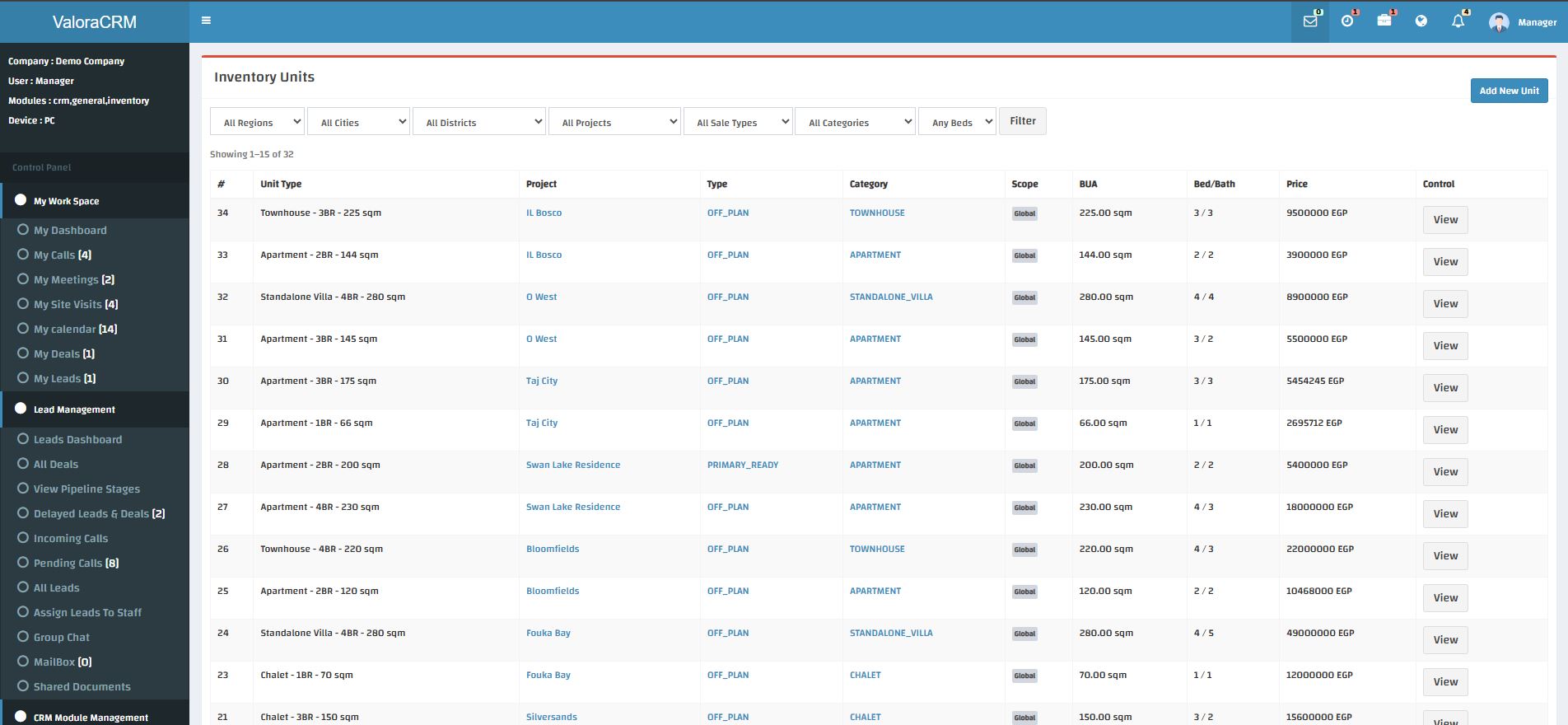
ValoraCRM inventory units list filtered by region, city, district, project, sale type and category, with price and bed/bath columns
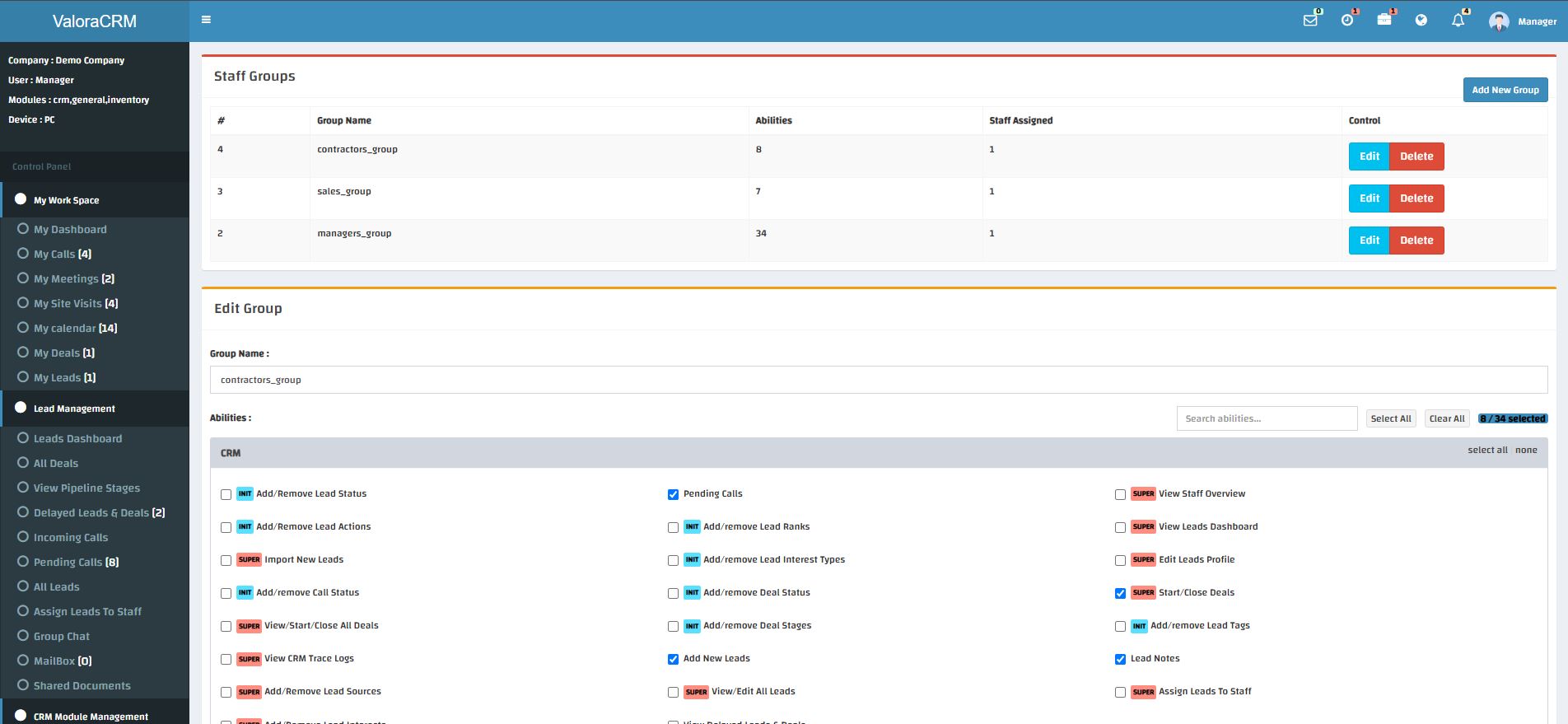
ValoraCRM staff groups screen showing granular, per-ability permission checkboxes grouped by CRM module
02MANAGER

Build your team and control access.

Add staff members, arrange them into staff groups and create the structure that reflects your business. Every staff group gets its own checklist of granular abilities — from adding leads to closing deals — so you decide exactly what each role can see and do, not just who has "admin" access.

  • Add and manage staff profiles
  • Organise teams into permission-based staff groups
  • Review staff activity through Trace Logs
03MANAGER

Capture, import and assign leads.

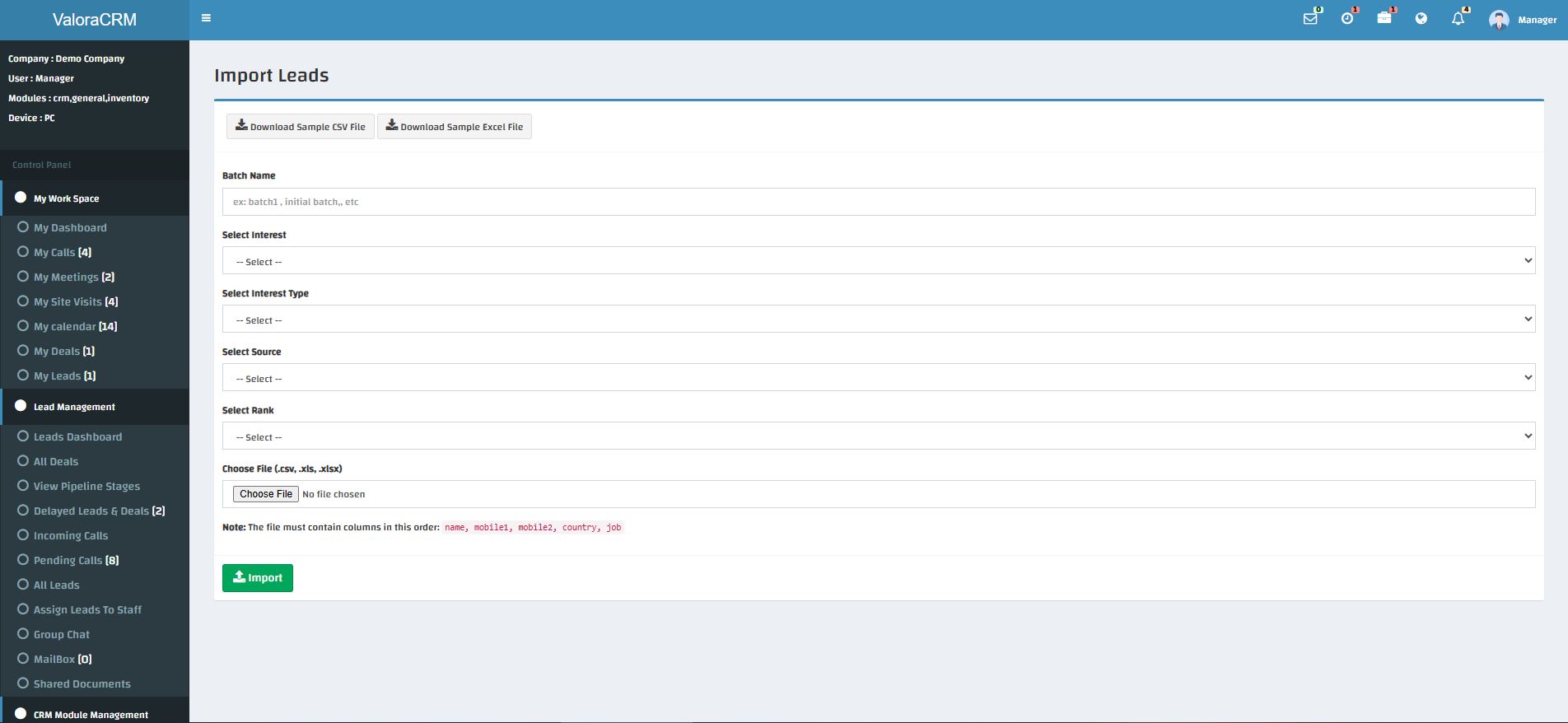
Bring opportunities into ValoraCRM one at a time or in bulk through lead import — upload a CSV or Excel file, tag the whole batch with an interest, source and rank up front, and download a sample file so your column format is always right. Every lead can then be classified by source, interest and rank, and assigned directly to the staff member best placed to respond. Import history helps you keep data operations transparent.

  • Add leads manually or import lead lists
  • Track the origin and quality of each lead
  • Assign clear ownership from day one
ValoraCRM lead import screen with batch name, interest, source and rank tagging, and file upload
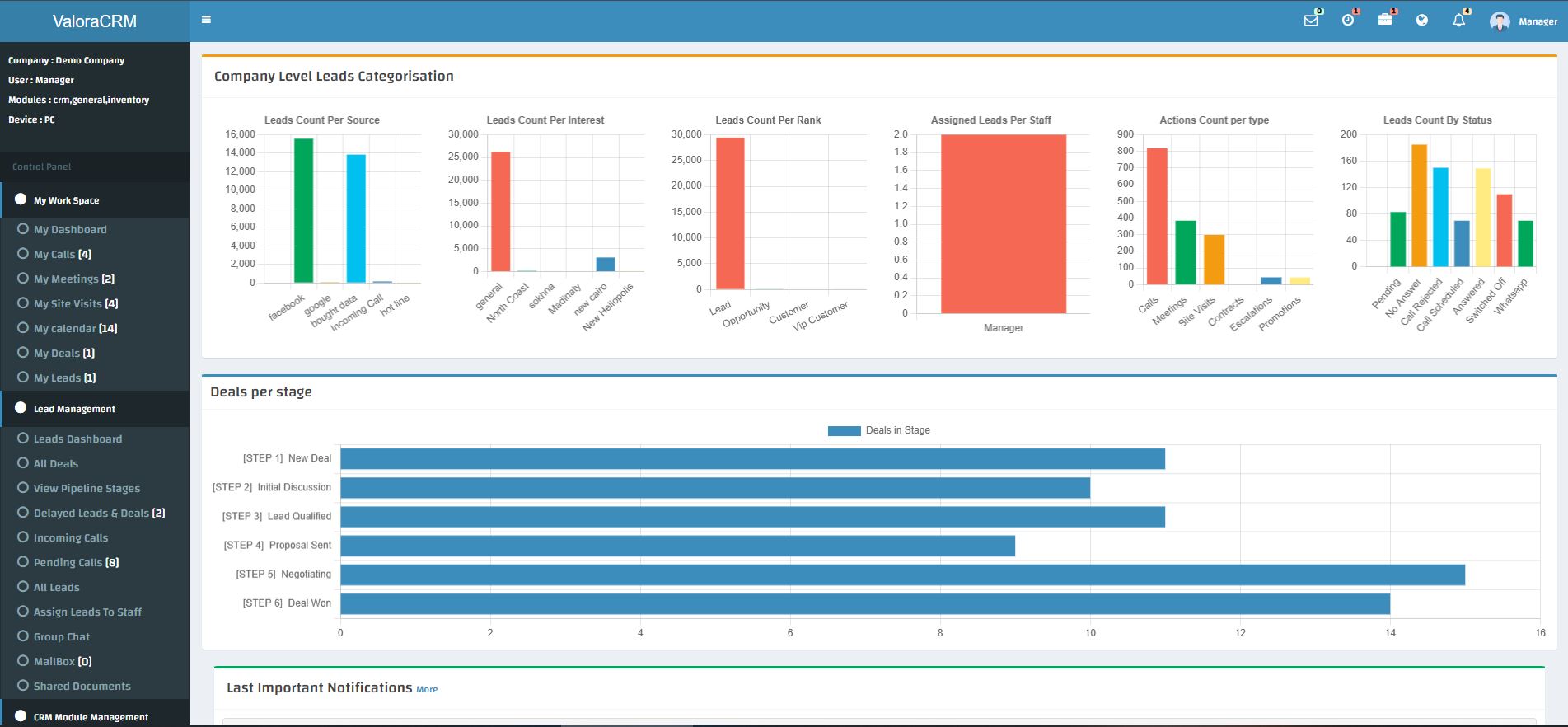
ValoraCRM company dashboard with six charts covering leads by source, interest, rank, assigned staff, action type and status, plus a deals-per-stage funnel
04MANAGER

Monitor activity, pipeline and performance.

Use company-wide lead and deal dashboards to understand work in motion at a glance: leads broken down by source, interest, rank and assigned staff, a deals-per-stage funnel from New Deal through Deal Won, and a live feed of important notifications. Trace Logs provide an additional, searchable layer of visibility for every action across CRM, inventory and admin.

  • Review all deals and pipeline stages
  • Analyse lead quality by source, rank and interest
  • Maintain visibility with Trace Logs

SALES STAFF WORKFLOW

Know your next move.
Build stronger client relationships.

Sales staff begin each day with a personal workspace that makes priorities clear. They can see their assigned leads, calls, meetings, site visits, deals and calendar — then focus on the action that matters most.

01SALES STAFF

Start in your personal workspace.

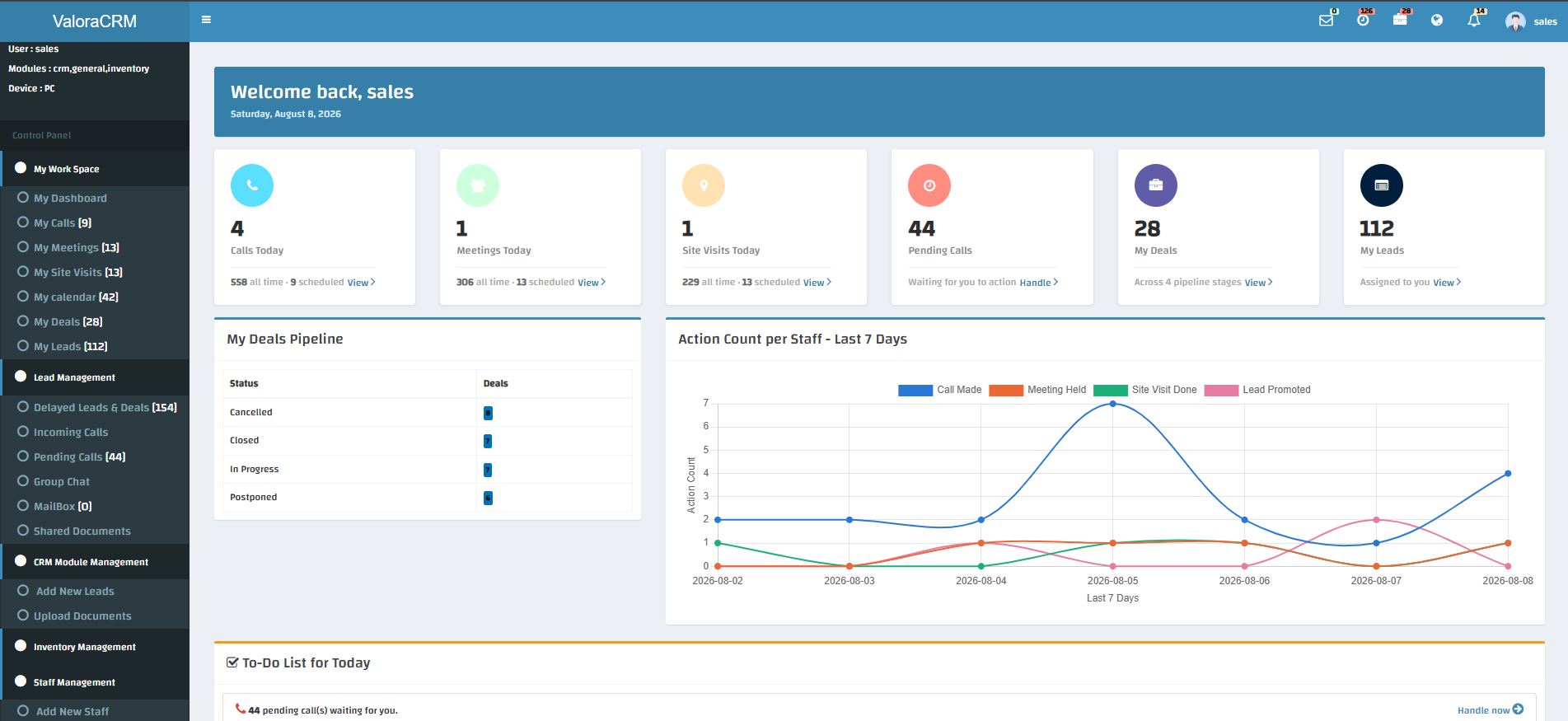
My Dashboard gives every staff member an immediate view of their workload: today’s calls, meetings, site visits, pending calls, active deals and assigned leads, a personal deals-pipeline breakdown, and a 7-day activity chart tracking calls made, meetings held, site visits done and leads promoted. The daily to-do list makes outstanding action impossible to overlook.

  • Review calls, meetings and visits for today
  • See pending calls waiting for action
  • Review assigned leads and deals at a glance
ValoraCRM personal staff dashboard with today's calls, meetings, site visits, pending calls, deals and leads stat cards
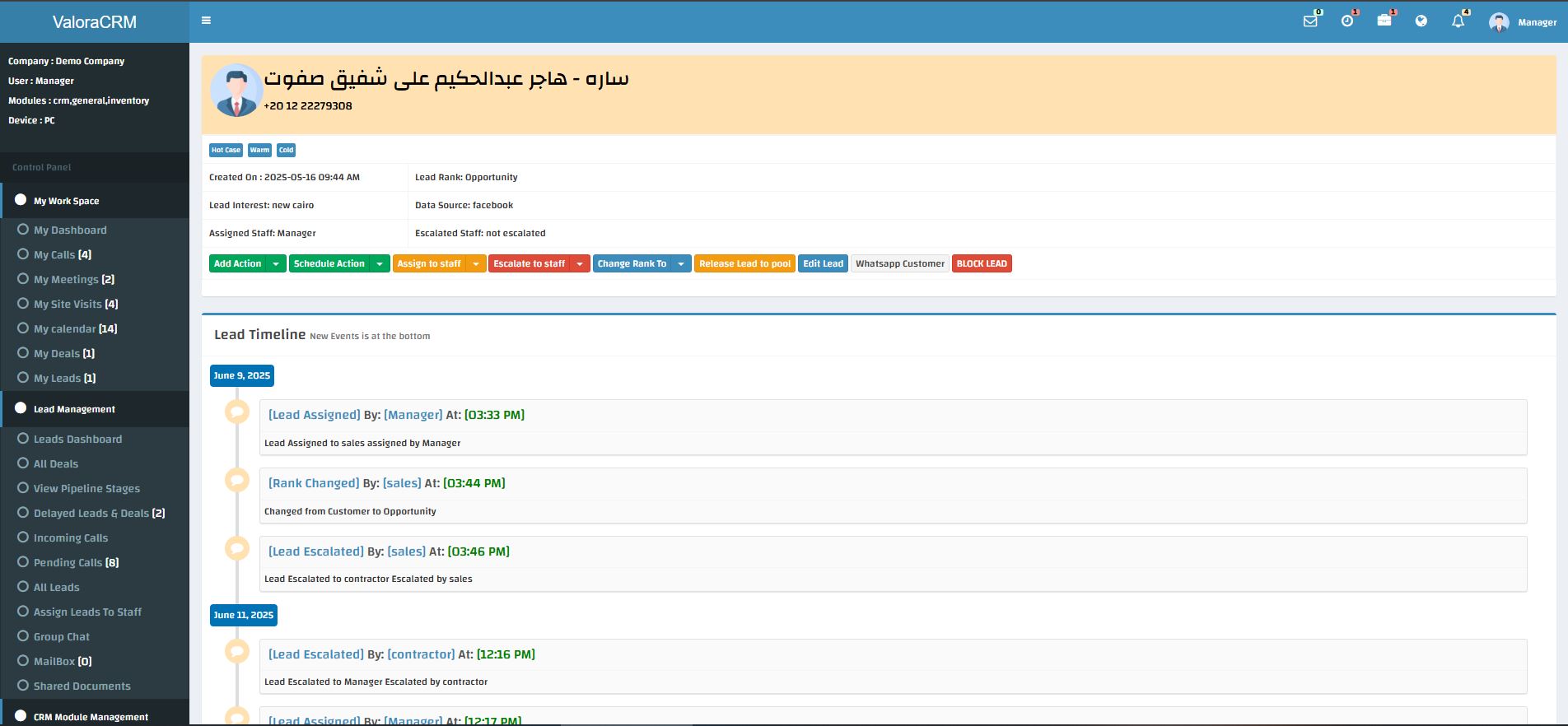
ValoraCRM lead timeline showing rank, interest and source at a glance, action buttons and a full chronological event history
02SALES STAFF

Work each lead with complete context.

Open a lead and see everything at once: rank, interest, source and who it's assigned or escalated to, plus one-click actions to log an action, schedule a follow-up, change rank, escalate, message the customer on WhatsApp, or release it back to the pool. Every change lands on a full chronological timeline, so the relationship stays clear for everyone involved.

  • Understand lead interest and priority
  • Record actions and status changes as you work
  • Keep a reliable, timestamped history for manager review
03SALES STAFF

Plan calls, meetings and site visits.

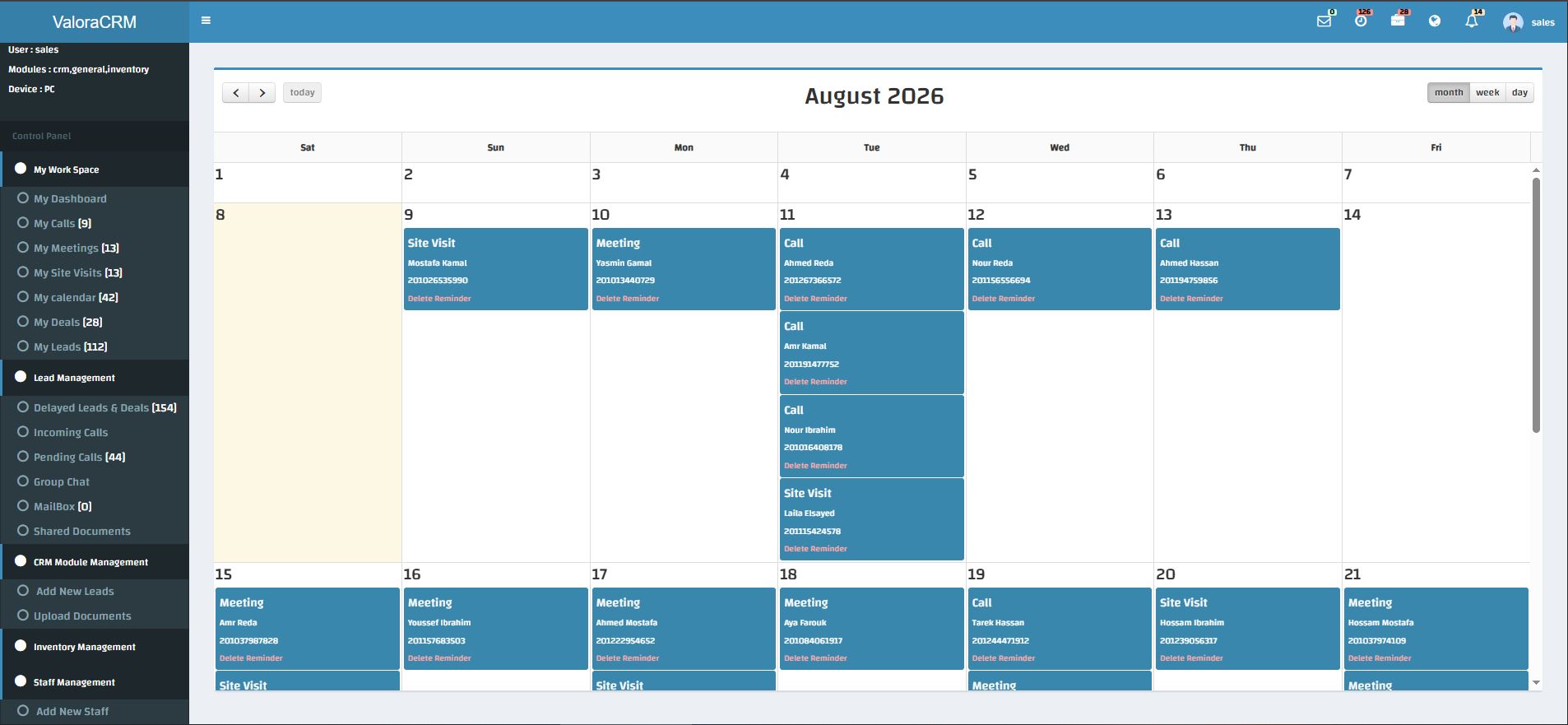
Turn follow-up into a dependable routine. Use the dedicated calls, meetings and site-visit areas to organise client activity — each with double-click inline editing for fast updates — while your personal calendar lays out every call, meeting and site visit for the month in one color-coded view.

  • Manage incoming and pending calls
  • Schedule client meetings and site visits
  • Stay organised through My Calendar
ValoraCRM monthly calendar with color-coded calls, meetings and site visits
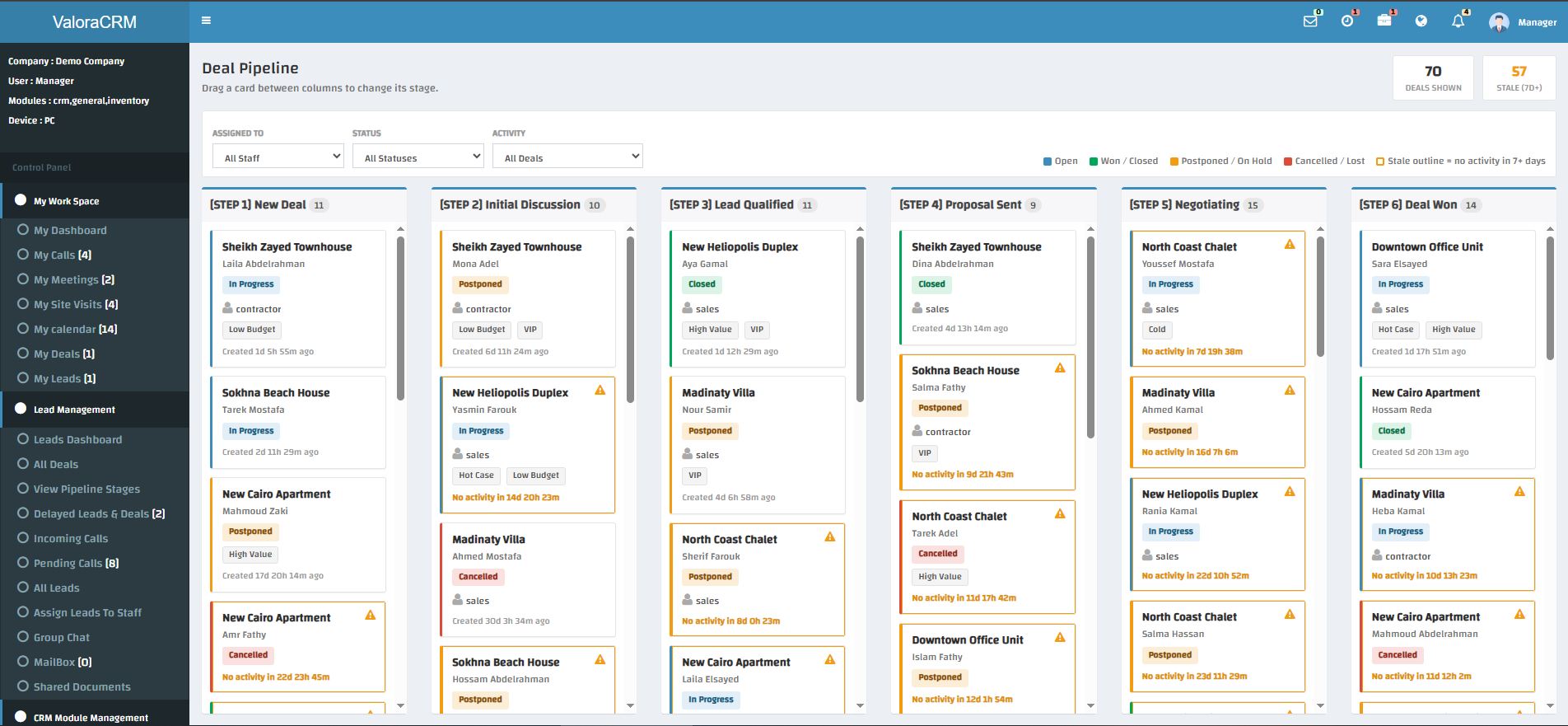
ValoraCRM drag-and-drop deal pipeline board with six stages from New Deal to Deal Won, and stale-deal warning icons
04SALES STAFF

Move opportunities through the deal pipeline.

When a lead becomes a deal, drag its card between six pipeline stages — New Deal, Initial Discussion, Lead Qualified, Proposal Sent, Negotiating and Deal Won — with a warning icon flagging any deal with no activity in 7+ days. My Deals gives you a personal view of work in progress, so you stay focused on the next conversation, document or approval needed to move forward.

  • View your active deals in one place
  • Follow progress across pipeline stages
  • Keep your manager informed through accurate updates

LEARN AT YOUR OWN PACE

Video guidance for every stage.

Use this space for quick product walk-throughs, onboarding sessions and role-specific tutorials.

Manager video guide preview showing the company dashboard
MANAGER GUIDE · 05:20Configure and oversee your operation
Sales staff video guide preview showing the lead timeline
SALES STAFF GUIDE · 04:45Work leads, activities and deals

Ready to see this workflow in your own business?

Book a guided ValoraCRM demo with our team.

Request a demo